Digital Camera X-Ray: What’s Inside a Digital Camera?
A digital camera may look like a simple device from the outside, but inside it contains a complex combination of optical, mechanical and electronic components.
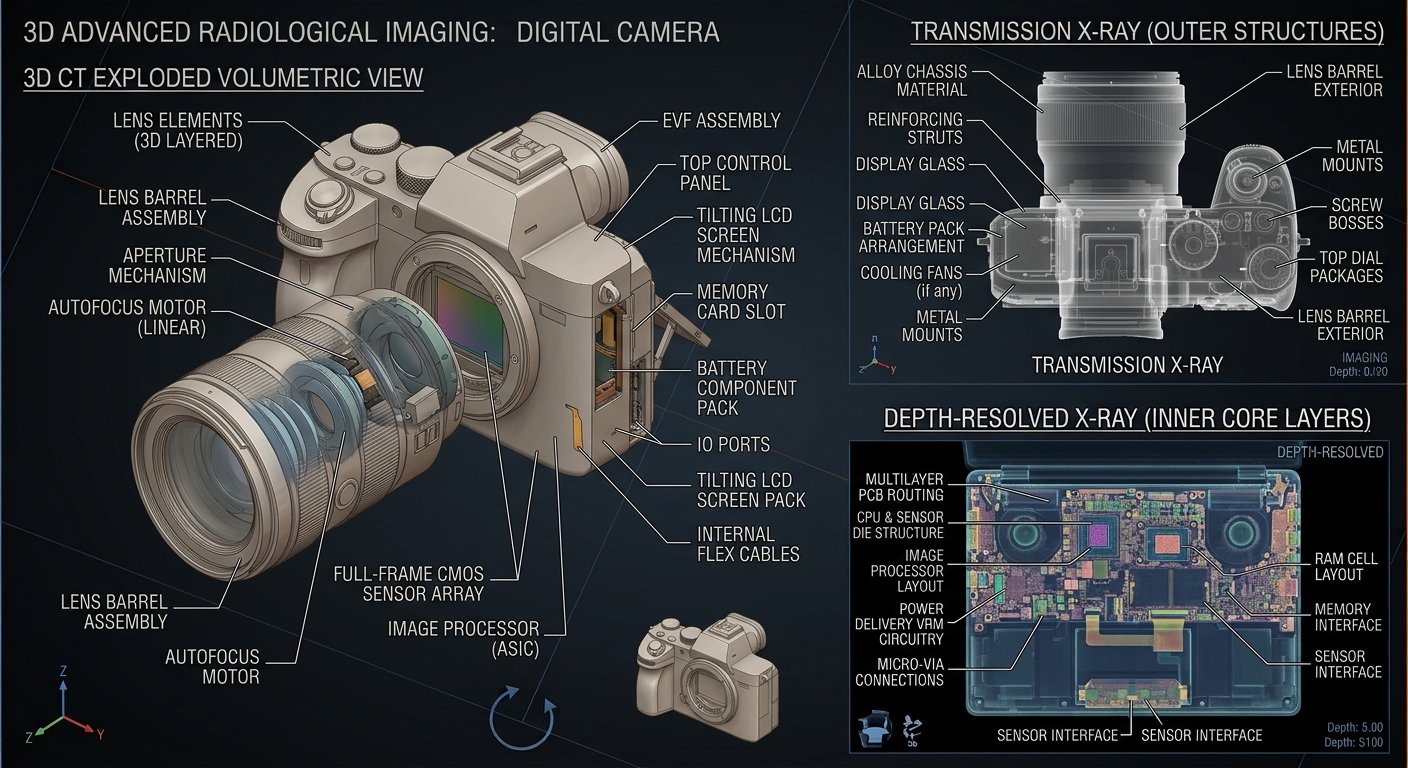
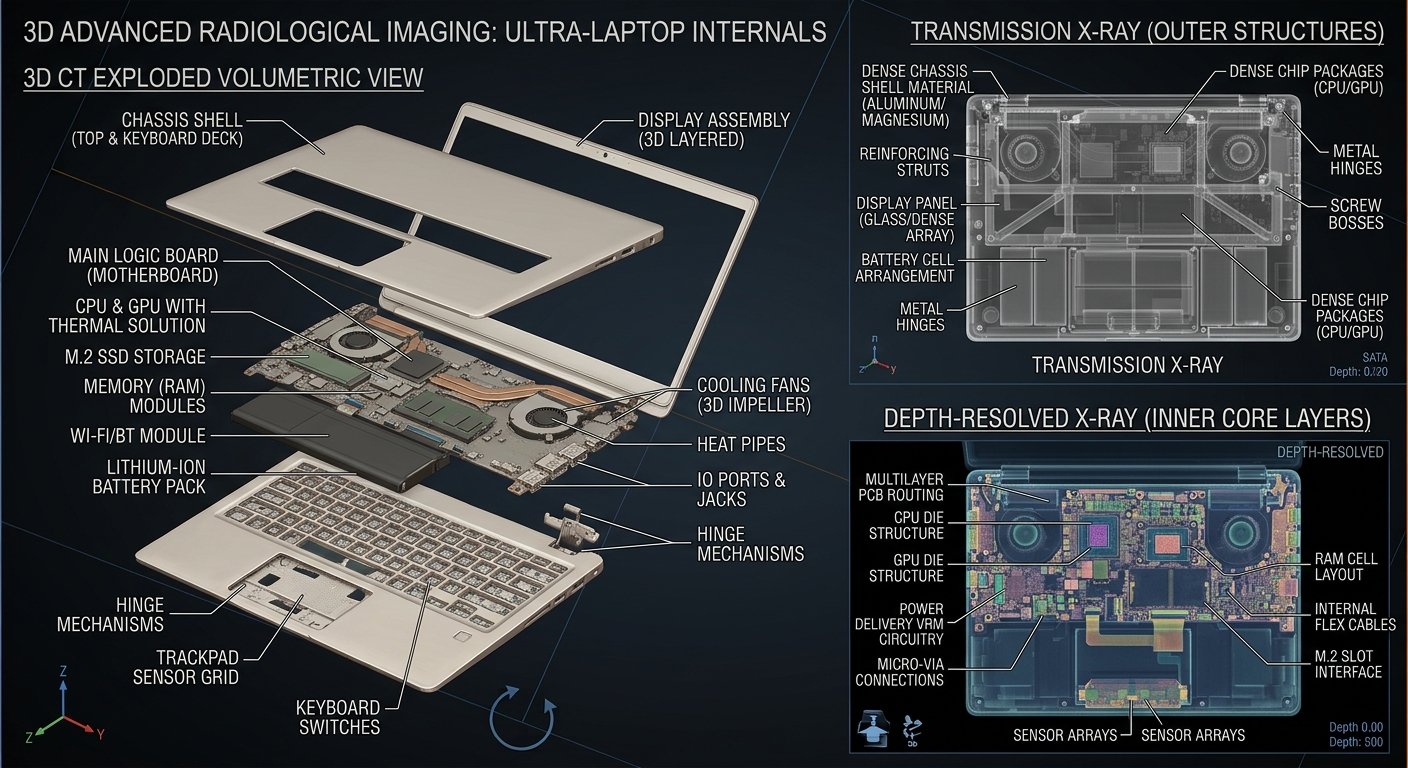
An X-ray view can reveal the hidden internal arrangement of the camera without opening its outer housing. From the lens assembly to the image sensor, circuit boards and battery compartment, an X-ray can provide a fascinating look at the technology inside a digital camera.
📷 What Is a Digital Camera X-Ray?
A digital camera X-ray is an imaging view of a camera’s internal structure produced using X-ray imaging equipment.
Unlike a normal photograph, which shows the outside of the camera, an X-ray can reveal components hidden beneath the casing.
This makes X-ray imaging an interesting way to explore the internal architecture of electronic devices.
🔍 What Can You See Inside a Digital Camera?
Depending on the camera model and X-ray image, several internal components may be visible.
1. Lens Assembly
The lens is one of the most recognizable components.
Inside a camera lens are multiple optical elements designed to control how light enters the camera.
In cameras with zoom lenses, the X-ray may reveal the arrangement of several lens groups and the mechanical structures that allow them to move.
2. Image Sensor
The image sensor is one of the most important electronic components in a digital camera.
It converts incoming light into electronic signals that can be processed into a digital image.
Common sensor technologies include:
CMOS
CCD
The sensor is positioned behind the lens system.
3. Circuit Boards
A digital camera contains one or more electronic circuit boards.
These boards may contain:
Integrated circuits
Processors
Memory components
Connectors
Capacitors
Resistors
Power-management components
The circuit boards control image processing, storage, communication and many other camera functions.
4. Shutter Mechanism
Many digital cameras contain a mechanical shutter.
The shutter controls the period during which light reaches the image sensor.
In an X-ray image, mechanical components of the shutter assembly may appear as small, precisely arranged structures near the sensor and lens pathway.
5. Battery Compartment
Portable digital cameras require a battery to power their electronic systems.
The battery compartment and electrical contacts may be visible in an X-ray image.
The battery supplies power to components such as the processor, display, sensor and lens mechanisms.
6. Flash Unit
Many cameras include an integrated flash.
The flash system may contain:
Flash tube
Capacitor
Electrical circuitry
Reflector
The capacitor stores electrical energy that can be released rapidly to produce the flash.
7. Display and Control Components
Digital cameras often contain an LCD display and several control buttons.
Behind these external controls are electronic switches, connectors and circuit-board components.
An X-ray can reveal how these components are positioned inside the camera body.
🧠 How Does a Digital Camera Work?
The basic process can be simplified into several steps:
The sensor converts the incoming light into electronic information.
The camera’s processor then processes this information and creates a digital image that can be stored on memory or transferred to another device.
🩻 What Does an X-Ray Reveal?
A digital camera X-ray can help visualize the internal arrangement and density of components.
Depending on the imaging technique, you may be able to identify:
Lens elements
Lens housing
Image sensor area
Circuit boards
Integrated circuits
Battery
Flash capacitor
Mechanical gears
Motors
Connectors
Screws and structural supports
The exact appearance varies significantly between camera models.
⚙️ Why Are There So Many Small Components?
Modern digital cameras combine several different technologies into a relatively small space.
Optical components handle light.
Mechanical components move lenses and shutters.
Electronic components process information and control the camera.
Power systems provide electricity to all of these components.
This combination of optics + mechanics + electronics is what makes a digital camera such an interesting device to explore with X-ray imaging.
🎓 Why Is a Digital Camera X-Ray Useful for Students?
Digital camera X-rays can be useful as an educational visual aid for students studying:
Electronics
Physics
Engineering
Computer science
Digital technology
Optics
Product design
Mechanical systems
Teachers and professors can also use internal X-ray images to demonstrate how modern electronic devices are constructed.
🔬 Digital Camera Internal Anatomy — Quick Guide
Component
Main Function
Lens
Focuses light
Image Sensor
Converts light into electronic signals
Processor
Processes image information
Circuit Board
Connects and controls electronic components
Shutter
Controls exposure time
Battery
Supplies electrical power
Flash
Provides additional illumination
Memory
Stores digital photographs
Motors/Gears
Move mechanical components
LCD Display
Shows images and camera information
💡 Did You Know?
A camera’s internal structure can be surprisingly complex despite its compact size. A single camera body can combine precision optics, miniature motors, mechanical assemblies, electronic circuits and image-processing hardware.
An X-ray provides a unique way to observe this hidden engineering without removing the outer casing.
🏫 Useful for Education
This Tech X-Ray article can be useful for:
Students • Teachers • Professors • Colleges • Schools • Academies • Electronics Learners • Engineering Students • Technology Enthusiasts
⚠️ Important Note
The exact internal components and their arrangement differ between camera models. An X-ray image should therefore be used as a visual guide rather than assumed to represent the internal design of every digital camera.
Digital Camera X-Ray Keywords
digital camera x ray, digital camera xray, camera x ray, camera inside x ray, camera internal parts, digital camera anatomy, camera internal structure, what’s inside a camera, camera components, camera lens mechanism, image sensor, CMOS sensor, CCD sensor, digital camera components, electronics x ray, electronic device x ray, technology x ray, camera teardown, camera engineering, camera mechanism, camera circuit board, Tech X-Ray
Suggested Tags
Digital Camera X-Ray, Camera X-Ray, Digital Camera Anatomy, Camera Internal Parts, What’s Inside a Camera, Camera Components, Image Sensor, CMOS Sensor, Camera Lens, Camera Mechanism, Electronics X-Ray, Technology X-Ray, Electronic Devices, Camera Engineering, Digital Camera Inside, Tech X-Ray
Smartphone X-Ray — What’s Really Inside Your Phone?
A smartphone may look like a simple glass screen from the outside, but underneath that thin surface is a highly engineered combination of electronics, sensors, cameras, batteries, antennas and tiny mechanical components.
In this Tech X-Ray exploration, we’ll look beneath the display and discover what makes a modern smartphone work.
Although the exact internal layout differs between manufacturers and models, most modern smartphones contain many of the same fundamental components.
1. Display — The Face of the Smartphone
The display is the largest visible component of the phone.
Modern smartphones may use technologies such as:
OLED
AMOLED
LTPO OLED
LCD
The display assembly can contain multiple layers, including:
Protective glass
Touch-sensing layer
Display panel
Polarizing layers
Flexible circuit connections
Display controller
On OLED-based phones, individual pixels produce their own light, allowing manufacturers to make extremely thin displays.
2. Touchscreen Digitizer
When you touch the screen, the phone needs to determine exactly where your finger is.
The touchscreen uses a sensing layer to detect changes caused by your finger.
This information is sent to the touch controller, which communicates with the phone’s processor.
So when you tap an icon, the process is essentially:
At the center of the smartphone is the main processor, commonly called the SoC (System on Chip).
It performs enormous numbers of calculations every second.
A modern smartphone SoC can contain:
CPU
GPU
AI/NPU processor
Image signal processor
Memory controllers
Security hardware
Communication interfaces
The processor controls everything from opening applications to processing camera images and running games.
4. RAM — Temporary Working Memory
RAM allows the smartphone to keep frequently used information readily available.
When you open several applications, RAM helps the operating system keep those applications and their data available.
RAM is extremely fast compared with permanent storage, but its contents are normally lost when the phone is completely powered off.
5. Internal Storage
Your photos, videos, applications and documents are stored in non-volatile memory.
Modern smartphones commonly use flash storage.
The storage system contains memory chips that can hold data even when the phone is switched off.
A typical X-ray illustration can show these memory chips positioned close to the main processor.
6. Battery — The Power Source
The battery is usually one of the largest components inside a smartphone.
Modern smartphones commonly use lithium-ion or lithium-polymer battery technology.
The battery stores electrical energy and supplies power to the phone’s electronic circuits.
It powers:
Processor
Display
Cameras
Speakers
Sensors
Wireless systems
Charging circuits
The battery is usually a flat rectangular pack occupying a large portion of the internal space.
7. Battery Protection and Management
The battery is not connected directly to every component.
A battery-management and power-management system controls how electrical energy is distributed.
It can monitor and manage:
Battery voltage
Charging
Temperature
Current
Battery protection
Power distribution
This helps the phone operate safely and efficiently.
8. Motherboard — The Electronic Highway
The smartphone motherboard, also called the main logic board, contains many of the phone’s most important electronic components.
It may include:
Processor
RAM
Storage
Power-management ICs
Charging circuitry
Wireless communication chips
Audio circuitry
Display controllers
Camera interfaces
Unlike a desktop computer motherboard, a smartphone motherboard is extremely compact.
Some phones use multilayer circuit boards with microscopic electrical connections running through different layers.
9. Cameras
Modern smartphones can contain several cameras.
Depending on the model, there may be:
Main camera
Ultra-wide camera
Telephoto camera
Depth sensor
Front-facing camera
Each camera module can contain:
Lens system
Image sensor
Autofocus mechanism
Optical stabilization components
Flexible circuit connection
10. Image Sensor
Behind the camera lens is the image sensor.
The sensor converts incoming light into electrical signals.
The two major sensor technologies commonly encountered in digital cameras are:
CMOS
CCD
Modern smartphones predominantly use CMOS image sensors.
The sensor sends image data to the phone’s image-processing hardware, where computational photography can transform it into the final photograph.
11. Optical Image Stabilization
Some smartphone cameras contain tiny moving components that compensate for hand movement.
Optical image stabilization can physically shift part of the camera system or sensor to reduce the effects of movement.
This is an excellent feature to highlight in an X-ray animation because the camera module contains precision mechanical components despite its tiny size.
12. Flash
The small light next to the camera is usually an LED flash.
It provides additional illumination when taking photographs or recording video in dark conditions.
Inside the phone, the flash is connected to the motherboard through the electrical circuit.
13. Speakers
Smartphones usually contain at least one speaker system and often multiple speaker modules.
Speakers convert electrical signals into sound.
A typical speaker contains:
Permanent magnet
Voice coil
Diaphragm
Housing
The speaker’s movement creates pressure variations in the air that we perceive as sound.
14. Microphones
Smartphones contain several tiny microphones.
They can be used for:
Phone calls
Video recording
Voice messages
Noise cancellation
Voice assistants
Multiple microphones allow the phone to determine sound direction and help reduce unwanted background noise.
15. Vibration Motor / Haptic System
The vibration system produces tactile feedback.
Older phones commonly used simple rotating vibration motors, while modern smartphones may use more sophisticated linear haptic actuators.
The actuator can create precise vibrations for:
Notifications
Keyboard feedback
Touch controls
Alerts
Gaming
16. Charging Port
The charging port connects the smartphone to an external power source.
Depending on the phone, the connector may be:
USB-C
Lightning
Another proprietary connector
The port can carry:
Electrical power
Data
Accessory connections
Inside the phone, the connector is mounted to a circuit board or flexible assembly.
17. Wireless Charging System
Some smartphones support wireless charging.
A wireless charging system can contain a flat coil positioned behind the back panel.
The charging pad creates an electromagnetic field.
The coil inside the smartphone receives energy from that field and the charging circuitry converts and manages it for battery charging.
In an X-ray image, the charging coil can appear as a large circular or rectangular pattern behind the battery.
18. Cellular Antennas
Your smartphone needs antennas to communicate with cellular networks.
There can be multiple antennas positioned around the phone.
They support different radio functions and frequency bands.
The antenna system may be used for:
Cellular communication
4G
5G
Voice
Mobile data
The antennas are carefully positioned because the phone’s metal frame and other components can affect radio performance.
19. Wi-Fi and Bluetooth
The phone also contains wireless communication hardware for:
Wi-Fi
Bluetooth
Wireless accessories
Local networking
The radio chips communicate with the antennas to transmit and receive wireless signals.
20. NFC
Many modern smartphones contain an NFC (Near Field Communication) system.
NFC can be used for:
Contactless payments
Device pairing
Access cards
Reading NFC tags
The NFC antenna is often located near the rear portion of the phone.
21. GPS / GNSS System
Your smartphone can determine its location using satellite navigation systems.
Depending on the device, the positioning system can receive signals from systems such as:
GPS
Galileo
GLONASS
BeiDou
The phone combines satellite information with other sensors and network information to improve positioning.
22. Accelerometer
The accelerometer detects changes in movement and acceleration.
It can determine whether the phone is:
Moving
Tilting
Rotating
Being shaken
It is used for:
Screen rotation
Gaming
Fitness applications
Motion detection
System controls
23. Gyroscope
The gyroscope measures rotational movement.
Together, the gyroscope and accelerometer provide the phone with detailed information about its orientation and movement.
These sensors are especially important for:
Gaming
Augmented reality
Navigation
Camera stabilization
Motion tracking
24. Proximity Sensor
The proximity sensor detects when an object is close to the phone.
During a phone call, it can detect when your face is near the display and help prevent accidental touches.
Modern smartphones may use different sensing technologies depending on the design.
25. Ambient Light Sensor
The ambient light sensor measures the surrounding light level.
The phone can use this information to automatically adjust display brightness.
This helps make the screen easier to see while also managing power consumption.
26. Biometrics
Many smartphones contain biometric hardware.
Depending on the model, this may include:
Fingerprint sensor
Face-recognition cameras
Infrared sensors
Depth-sensing hardware
These systems allow the phone to identify or authenticate the user.
27. Cooling System
Smartphones generate heat, especially during:
Gaming
Video recording
Fast charging
High-performance computing
To move heat away from important components, some smartphones use:
Graphite sheets
Copper components
Vapor chambers
Thermal pads
Heat spreaders
A vapor chamber is particularly interesting in an X-ray visualization because it can appear as a thin, large-area thermal component.
28. Motherboard and Flexible Cables
Not every component is connected directly with rigid wiring.
Smartphones use flexible printed circuits, often called flex cables.
These connect components such as:
Display
Cameras
Speakers
Charging port
Buttons
Sensors
Motherboard
The flex cables allow manufacturers to fit many components into an extremely thin body.
29. Buttons and Switches
Physical buttons can include:
Power button
Volume buttons
Action/function buttons
Tiny switches underneath these buttons send electrical signals to the phone’s control circuitry.
30. Frame and Structural Components
The outer frame protects and supports the internal components.
Depending on the smartphone, the structure may contain:
Aluminum
Stainless steel
Titanium
Magnesium
Glass
Engineering plastics
The frame also contributes to antenna performance and structural rigidity.
31. Water and Dust Protection
Many modern smartphones are designed with seals and gaskets around openings.
These can help reduce the entry of:
Water
Dust
Moisture
Protection levels vary significantly between models, so an exact rating should always be checked for the particular phone.
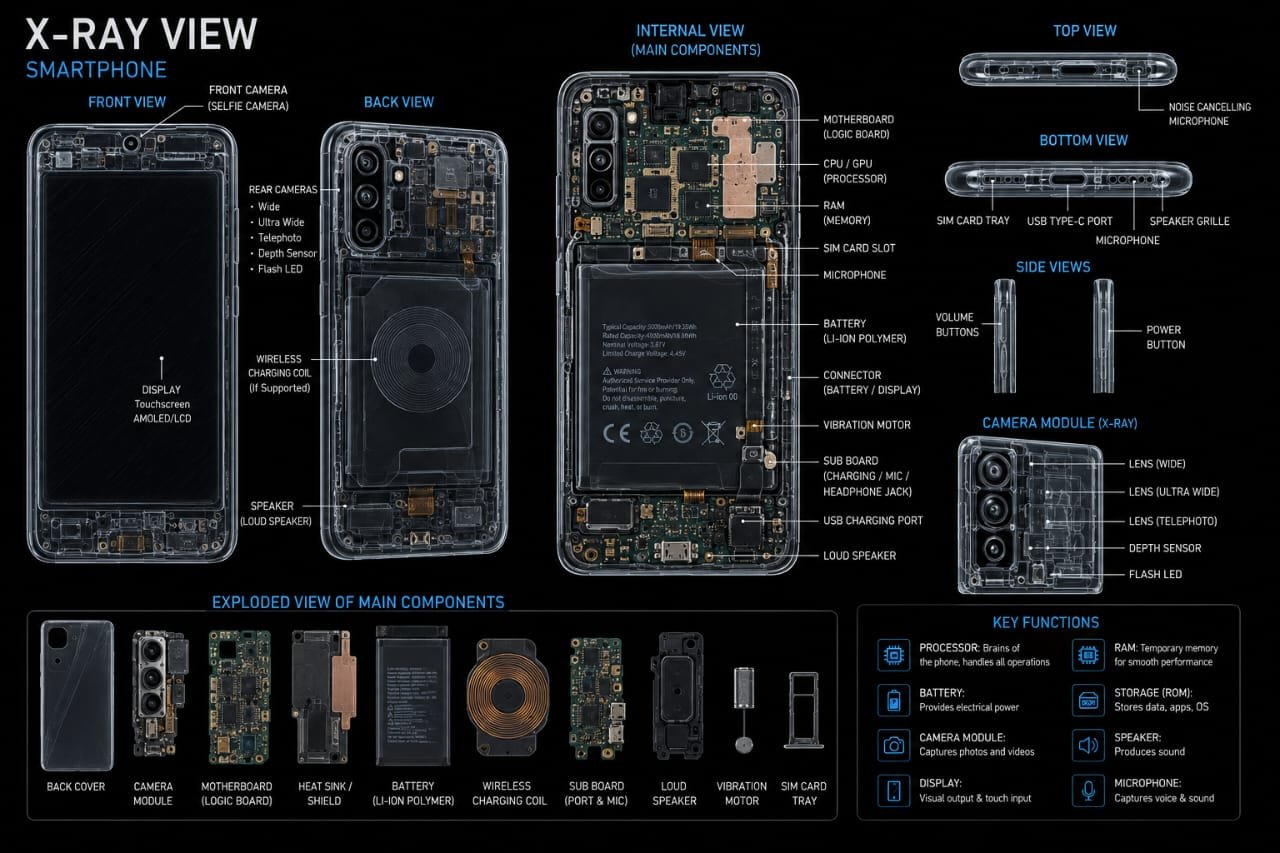
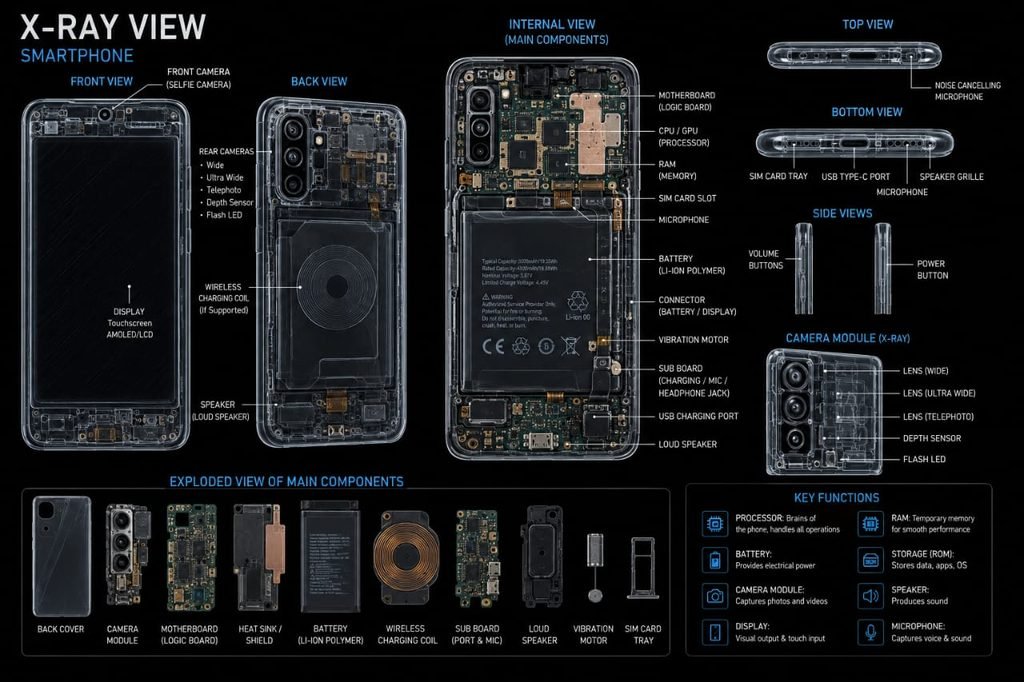
32. What Does a Smartphone X-Ray Reveal?
If the outer shell and display are made transparent, we can visualize the phone as several layers.
One of the greatest engineering challenges is fitting all these components into a device only a few millimeters thick.
Manufacturers use:
Miniaturized chips
Stacked circuit boards
Flexible cables
Compact batteries
Small sensors
Integrated circuits
Custom-designed components
The result is essentially a complete computer, camera, communication device and sensor platform inside a pocket-sized object.
35. The Most Interesting Parts for a Tech X-Ray
For your interactive Tech X-Ray website, these should become clickable cards:
📱 DISPLAY
Explore the layers beneath the glass.
🔋 BATTERY
See the largest energy-storage component.
🧠 PROCESSOR
Discover the electronic brain.
📷 CAMERA
Explore lenses, sensors and stabilization.
💾 STORAGE
See where your photos, videos and applications are stored.
📡 ANTENNAS
Discover how the phone communicates wirelessly.
🔊 SPEAKERS
See the tiny components that create sound.
🎤 MICROPHONES
Explore how your phone captures your voice.
🧭 SENSORS
Discover the accelerometer, gyroscope, proximity and light sensors.
⚡ CHARGING
Follow electricity from the charging port to the battery.
❄️ COOLING
See how heat moves away from the processor.
Final Takeaway
A smartphone is essentially a miniature computer, camera, communication device, navigation system and sensor platform combined into one small enclosure.
Behind the glass display are billions of electronic components working together with mechanical parts such as camera actuators, speakers, vibration systems and buttons.
The battery provides energy.
The processor performs calculations.
The memory stores information.
The cameras capture light.
The sensors detect movement and surroundings.
The antennas communicate with the outside world.
And the software coordinates all of these systems.
The next time you hold a smartphone, remember that beneath its smooth glass surface is an incredibly dense piece of engineering.